> ## Documentation Index
> Fetch the complete documentation index at: https://superflow-claude-superflow-portal-docs-78gpp8.mintlify.site/llms.txt
> Use this file to discover all available pages before exploring further.
# Comment Screenshots
> Superflow captures a screenshot with each comment, so feedback still makes sense after the page changes. Local mode covers login-gated sites.
Websites change. A comment that says "this headline is wrong" is only useful if you can still see the headline it pointed at. With screenshots on, Superflow captures the page at the moment each comment is made and attaches it to the comment.
## Turning screenshots on
Under **Comment Settings**, turn on **Take screenshot on comments**.
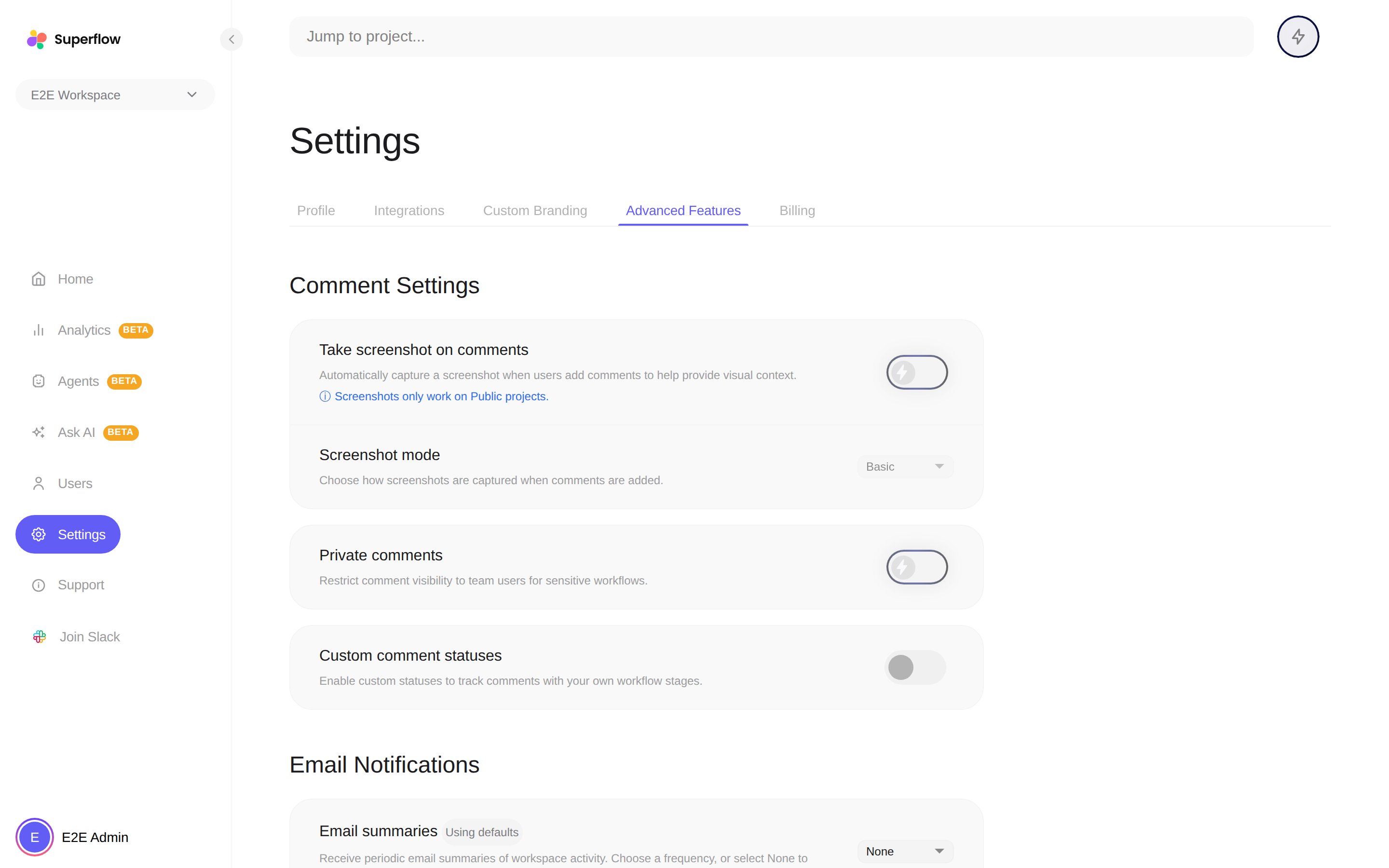 The **Screenshot mode** dropdown offers **Basic** and **Local**. Basic is right for most sites; read on for when to use Local.
## Basic vs. Local mode
| | **Basic** | **Local** |
| ----------------------- | ------------------------------------------------- | ------------------------------------------------------------- |
| How it works | Superflow's servers visit the page and capture it | The screenshot is captured in the commenter's own browser tab |
| Best for | Public sites | Login-gated sites, SSO, intranets, personalized pages |
| What the commenter sees | Nothing extra | A one-time browser permission prompt for screen sharing |
In Basic mode the capture happens server-side, which only works if the page is publicly reachable. If your site sits behind a login, the server would capture the login page instead. That is what **Local** mode is for: it uses the browser's own screen-sharing permission to capture exactly what the signed-in commenter sees.
In Local mode, the browser asks for screen-sharing permission when entering comment mode. If a reviewer declines, the toolbar shows a "Screenshots off" notice, and they can re-enable capture from the toolbar's menu with **Use Local Screenshot**. Superflow's own toolbar and widgets are excluded from the capture automatically.
The **Screenshot mode** dropdown offers **Basic** and **Local**. Basic is right for most sites; read on for when to use Local.
## Basic vs. Local mode
| | **Basic** | **Local** |
| ----------------------- | ------------------------------------------------- | ------------------------------------------------------------- |
| How it works | Superflow's servers visit the page and capture it | The screenshot is captured in the commenter's own browser tab |
| Best for | Public sites | Login-gated sites, SSO, intranets, personalized pages |
| What the commenter sees | Nothing extra | A one-time browser permission prompt for screen sharing |
In Basic mode the capture happens server-side, which only works if the page is publicly reachable. If your site sits behind a login, the server would capture the login page instead. That is what **Local** mode is for: it uses the browser's own screen-sharing permission to capture exactly what the signed-in commenter sees.
In Local mode, the browser asks for screen-sharing permission when entering comment mode. If a reviewer declines, the toolbar shows a "Screenshots off" notice, and they can re-enable capture from the toolbar's menu with **Use Local Screenshot**. Superflow's own toolbar and widgets are excluded from the capture automatically.